

veridive can transcribe your own audio and video — a recorded meeting, a lecture, an interview, a voice memo — and add it straight to your Library to analyze with DeepContext. Upload the file, pick the language and quality, and you get a clean, searchable, citable transcript. And it's remarkably cheap.
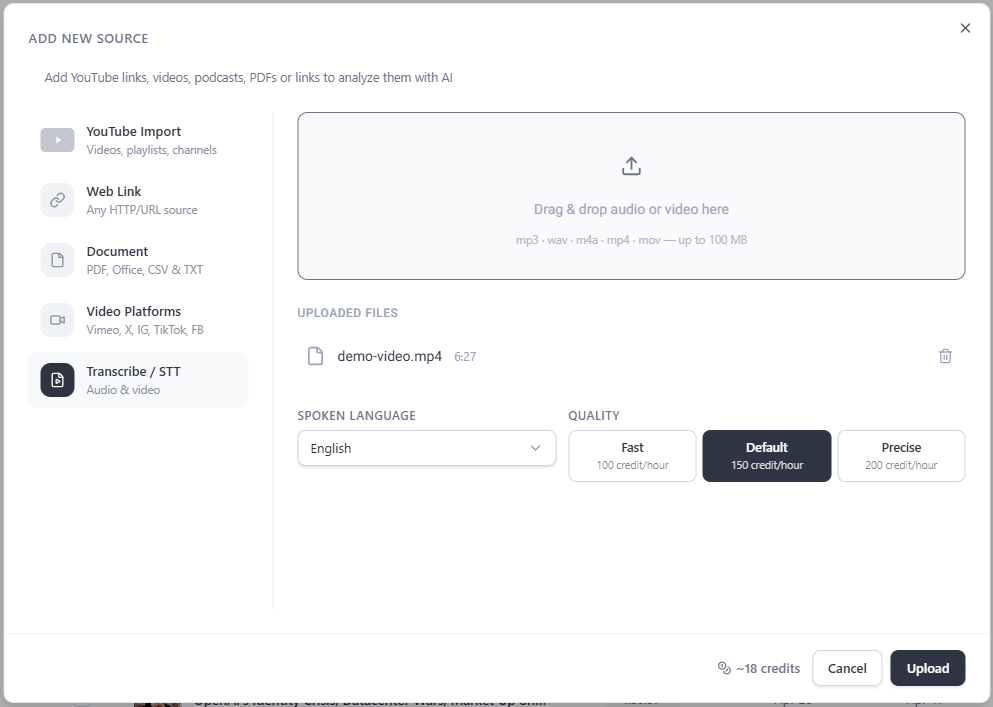
How to use it
- Open Add new source → Transcribe / STT Drag & drop an audio or video file (MP3, WAV, M4A, MP4, MOV — up to 100 MB).
- Choose the spoken language Helps accuracy.
- Pick a quality level Fast, Default or Precise — higher quality is more thorough (and costs a little more).
- Upload veridive transcribes it and adds it to your Library, ready to chat with and cite.
What it costs
Transcription is metered in credits per hour of audio:
| Quality | Credits / hour |
|---|---|
| Fast | 100 |
| Default | 150 |
| Precise | 200 |
Here's what that works out to in real money. Taking the Max plan's effective credit value (40,000 credits for $59 ≈ $0.0015 per credit) and the Default quality:
1 hour
~$0.22
150 credits
10 hours
~$2.21
1,500 credits
100 hours
~$22
15,000 credits
That's roughly 22 cents to transcribe an hour of audio — and it's already included in your plan, not a separate bill. Choose Fast and it's even less (~$0.15/hour); Precise is ~$0.30/hour.
Why it's a big deal: managed and human transcription services typically charge by the minute and can run into the tens of dollars per hour. veridive transcribes for cents — and the moment it's done, the audio is searchable, answerable and citable to the second with the rest of your Library. Transcription that's also instantly useful.
Note: the per-hour credit rates above come from the product; the dollar figures use the Max plan's effective credit value and are approximate. Your live balance and the in-app estimate are always the source of truth, and prices may change.